


On this page
- 01Before you start
- 02Video wall technologies
- 03Pixel pitch, PPI and resolution
- 04Brightness, contrast, refresh, colour
- 05Architecture and components
- 06Controller vs matrix vs encoder/decoder
- 07AV-over-IP
- 08Loop-through and daisy-chain
- 09Professional audio
- 10Meeting rooms and hybrid
- 11Signal-flow examples
- 12Site engineering
- 13Check that it works
- 14Common problems and how to fix them
- 15Frequently asked questions
- 16Talk to PSS about video walls
Professional AV is more than screens and speakers. Control rooms, boardrooms, auditoriums, classrooms, retail and outdoor advertising combine displays, processing, networks, audio, conferencing and central control. Design must cover viewing distance, pixel density, brightness, processing capacity, bandwidth, latency, acoustics, structural load, power, heat and service access.
The core question is never “how big is the wall” but what must the operator or audience see, from what distance, for how long, and in what light.
Before you start
- What content, how many simultaneous sources/windows?
- Room size, ambient light, operator seating?
- Wall W×H and structural capacity?
- Seamless LED or maximum LCD density?
- Equipment room location and longest cable run?
- 1080p / 4K / mixed; HDCP?
- Sources: HDMI, IP/ONVIF, VMS client?
- Cooling ownership and heat calc?
- Spare panel/modules and service contract?
- Room audio / PA ownership; AVoIP or direct architecture?
Video wall technologies
A video wall joins panels or LED cabinets into one surface — one image, many windows, or mixed sources.
LCD video walls
Grid of professional LCD panels (2×2, 3×3, 4×4…) driven by a controller/processor. Common in CCTV SOCs, command centres and monitoring rooms.
Pros: sharp text/maps/CCTV; mature sizes; many 24/7 models; panel-level swap; often cost-effective if seams are acceptable.
Cons: bezels; panel-to-panel colour/brightness ageing; needs precise alignment/calibration; mounts and service access must be planned.
Bezel-to-bezel (BtB) is the combined gap between active areas. Illustrative products: ~3.5 mm classic narrow-bezel; ~1.8 mm and ~0.88 mm ultra-narrow — confirm datasheet. Seam multiplies across the wall: four panels wide at 3.5 mm lose ~10.5 mm of image — minor on a camera grid, obvious on a face or map.
Direct-view LED (dvLED)
LEDs generate the image (not LCD backlight). Modules/cabinets assemble into a seamless surface.
Pros: no LCD bezel grid; flexible size/aspect; fine pitch for close viewing; high-brightness options; indoor/outdoor families; modular service.
Cons: fine pitch is expensive; power and heat; alignment/calibration critical; needs matching processor/sending-receiving cards; service path by cabinet design.
| # | Aspect | LCD video wall | Direct-view LED |
|---|---|---|---|
| 1 | Seam | Visible BtB grid (e.g. 0.88 / 1.8 / 3.5 mm) | Seamless surface |
| 2 | Brightness (illustrative) | Often ~500–700 nits | Indoor ~600–1,500+; outdoor often much higher |
| 3 | Pixel density | Very high (e.g. FHD per 55″) | Pitch-dependent |
| 4 | Min viewing distance | Flexible; ~2–3 m comfortable | Heuristic ≈ 1 m per mm pitch |
| 5 | Best fit | Control rooms, density/budget | Lobbies, seamless large format |
Indoor vs outdoor LED
| Characteristic | Indoor | Outdoor |
|---|---|---|
| Priority | Detail, close viewing, colour | Daylight visibility, weather |
| Pitch | Often fine | Often coarser for distance |
| Brightness (examples) | Some ~600–800 nits; others differ | Some ~5,000–10,000 nits or other ranges |
| Protection | Room-dependent | Dust/water/temperature — verify IP scope (e.g. IP65 on which face) |
| Use | Boardrooms, lobbies, control rooms | Billboards, façades, stadiums |
Other displays
Large-format commercial displays; laser projection; blended multi-projector; interactive panels — match room size, distance, light, maintenance and budget. Consumer TVs may suit low-duty multi-screen setups; they are generally not preferred for critical 24/7 walls (bezels, mounts, service, control, continuous duty).
Pixel pitch, PPI and resolution
Pixel pitch = centre-to-centre distance between adjacent LED pixels (mm): P0.9, P1.2, P1.5, P1.8, P2.5, P3.9, P4, P6, P10… Smaller pitch → more pixels in the same area → better close detail — and higher cost/processing load. Finer is not always better.
PPI ≈ 25.4 ÷ pitch (mm) for a regular LED grid (approximate linear density, not total wall resolution):
| Pitch | Approx. PPI |
|---|---|
| P0.9 | 28.2 |
| P1.2 | 21.2 |
| P1.5 | 16.9 |
| P1.8 | 14.1 |
| P2.5 | 10.2 |
| P4.0 | 6.35 |
| P10 | 2.54 |
Viewing-distance heuristic: ~1 mm pitch per 1 m nearest viewing distance (planning aid, not a standard). Small text/maps may need finer; distant advertising may tolerate coarser. Stricter planning sometimes uses pitch ≈ distance(m) ÷ 2 for “optimum.”
Native resolution:
H px = width(mm) ÷ pitch
;
V px = height(mm) ÷ pitch
. Example: 4,000 × 2,250 mm at P2.5 → 1,600 × 900 — a large wall is not automatically 4K. Confirm cabinet W×H, pixels per cabinet, cabinet count, total resolution, processor/sending capacity, aspect and service access before quoting.
Brightness, contrast, refresh, colour
Brightness (nits / cd/m²): match ambient light. Dim control rooms need less (and less glare over long shifts); daylight-facing surfaces need more. ~700 nits can be a starting probe for some bright rooms — not universal. Adjustable brightness helps.
Contrast: methods differ between OEMs — compare carefully.
Refresh / camera compatibility: broadcast and filmed screens need display + processor + camera settings to work together; high refresh alone does not guarantee quality.
Calibration: LCD panel matching and LED module brightness/colour — include in commissioning and after replacements.
Architecture and components
Sources: PCs/laptops, servers/dashboards, CCTV/VMS, conferencing, media players, broadcast/satellite — document count, resolution, frame rate, connectors, audio, HDCP.
Video wall controller: multi-in/out, scale/crop, windows, PiP, presets, bezel compensation, remote control, redundancy. Insufficient outputs cannot drive the wall at required resolution even if panels can.
LED processor: maps image to cabinets — inputs, scaling, sending cards, receiving cards, calibration software; may be combined or separate.
Mounts: wall, frame, floor stand, recess, suspend — total weight, alignment, access, outdoor wind. A 4×3 wall of 55″ panels is roughly 4.9 × 2.1 m and can weigh ~350–450 kg with mounts — drywall alone is not enough.
Cabling/power/network: HDMI, DisplayPort, SDI, USB/USB-C, Ethernet/fibre, audio/AoIP, RS-232/IR/IP, dedicated power, AV switches. Distance, data rate, EMI, routing and expansion matter.
LCD panel sizing (field): 55″ 16:9 active ≈ 1,217 × 685 mm. Wall W = (N × 1,217) + ((N−1) × seam). Example 4×3 at 3.5 mm seam ≈ 4,880 × 2,061 mm (~10 m², ~2.37:1).
| # | Layout (55″) | Nominal W × H | Typical use |
|---|---|---|---|
| 1 | 2 × 2 | ~2,438 × 1,373 mm | Guard house, small SOC |
| 2 | 3 × 2 | ~3,656 × 1,373 mm | Reception, briefing |
| 3 | 4 × 3 | ~4,880 × 2,061 mm | Main control room |
| 4 | 5 × 3 | ~6,101 × 2,061 mm | Command, multi-operator |
Viewing geometry: image bottom ~1.0–1.2 m AFF; seated eye ~1.2 m; max distance often ~3–6× image height for detail; avoid direct sun and downlight glare axes.
Signal transport: passive HDMI reliable only to about 5 m certified (many fail earlier at 4K) — then active optical HDMI or HDBaseT/fibre. Passive DP copper often 2–3 m. Place the equipment room around these limits.
Controller vs matrix vs encoder/decoder
Controller — processes and lays out content across the wall (scale, windows, bezel compensation).
Matrix switcher — routes inputs to outputs; does not necessarily resize, combine windows or spread one image across panels. Some boxes integrate both — verify each function.
Encoder — converts HDMI (etc.) to a network stream (may embed audio, USB, IR, serial).
Decoder — reconstructs stream to HDMI for a display. An IP decoder is not automatically a full video wall controller.
CCTV room paths (examples): cameras → VMS → workstation HDMI to controller; or compatible decoder streams; or AV-over-IP to wall endpoints. Match VMS protocols, codecs, layouts and ops needs.
AV-over-IP
Source → encoder → switch → decoder → display, managed by a control platform. Flexible multi-room routing and expansion when the network is designed for it — not plug-and-play on any office LAN.
Address bandwidth, switch capacity, multicast/IGMP, VLANs, QoS, latency/jitter, redundancy, endpoint compatibility, security and licensing. Bandwidth depends on codec, resolution, frame rate, compression, stream count, uni/multicast.
Latency = capture + encode + network + decode + display. Sub-frame claims (~16.7 ms at 60 fps) are product-specific — measure the full path for interactive and live monitoring work. Not every project needs AVoIP; direct links, extenders, matrices and dedicated processors may fit simpler paths better.
Loop-through and daisy-chain
Confirm which “loop” is meant:
Video loop-through — pass the same signal downstream (not independent selection or wall processing).
Daisy-chain / DP MST — multiple streams under specific source/bandwidth/display limits; ordinary loop may only mirror. Verify chaining mode, max displays, resolution/refresh, bezel compensation. Large walls usually prefer a dedicated controller.
Audio loop / ARC / eARC — selected display-to-soundbar return paths; not a full pro audio matrix.
Hearing-assistance induction loop — magnetic field for hearing devices — unrelated to video loop-through.
Professional audio
Mics: gooseneck, tabletop, wireless, ceiling arrays (beamforming — height/noise/reverb matter), boundary.
DSP: routing, EQ, dynamics, gain, AEC, auto-mix, delay, feedback management, control integration. Size by mic count, speaker zones, conferencing channels.
AEC: stops remote echo when loudspeaker audio re-enters local mics — needs correct reference routing, placement and acoustics; a DSP alone does not guarantee AEC.
Speakers / amps: ceiling, wall, pendant, active/passive, line array — coverage and intelligibility; amp selection by impedance, power, channels — watts alone ≠ compatibility.
Meeting rooms and hybrid
Small: commercial display, all-in-one camera/audio, USB to laptop/appliance, HDMI/USB-C, simple control.
Medium: separate mics/speakers, DSP+AEC, camera, room controller.
Large boardroom: mic zones / ceiling arrays, multi speaker zones, advanced DSP, PTZ + presets/tracking, multi displays, touch control, wired + wireless present.
PTZ / speaker tracking: test with real meetings — avoid hunting and bad frames.
USB-C: may carry video/data/power only if ports negotiate it — a USB-C jack ≠ guaranteed video. Wireless present: devices, guest access, latency, security, UX.
Signal-flow examples
Meeting: laptop → HDMI/USB-C or wireless → display/processor; mics → DSP/AEC → conferencing → remotes; remote audio → DSP → amps/speakers.
AVoIP wall: sources → encoders → switches → decoders/endpoints → displays.
LCD SOC: sources → wall processor → panel grid (+ bezel compensation).
dvLED: source → LED processor → sending → receiving cards → cabinets.
Site engineering
Structure: total weight, wall construction, reinforcement (ply/steel only if engineered for the load), anchors, suspend/outdoor wind, install access.
Front/rear service: push-pull/pop-out panels or rear access; LED front vs rear cabinets; spare modules/panels from compatible batches; clearance to pull a centre panel.
Power / inrush: max and typical watts; circuits; earthing; UPS for critical path; staggered/sequenced start per OEM if needed. Each 55″ wall panel often ~150–250 W → 12 panels ~2.4 kW.
Heat: BTU/h ≈ W × 3.412 (e.g. 2,000 W → 6,824 BTU/h; ~2.4 kW wall ≈ ~8,200 BTU/h plus desks/controller/lighting). Coordinate HVAC; distinguish max vs typical.
Glare: windows, downlights, reflections — brightness, anti-glare, blinds, positioning.
Cabling: type, distance, bend radius, shield, power/signal separation, clear labels.
Cyber: VLANs, auth, firmware process, separation from corporate/security networks as required.
Check that it works
- Alignment, resolutions/frame rates, scale/aspect, uniformity and layout switching verified.
- Cable-distance stability tested at the longest run; audio embed/extract confirmed.
- Audio coverage, intelligibility, levels, AEC and mute/volume paths demonstrated.
- Touch panel, source select, camera presets and failure recovery tested.
- As-built signal flow, IP map, cable schedule, DSP/control backups and training delivered.
Common problems and how to fix them
Pitch chosen without viewing distance
Fine pitch wastes money; coarse pitch fails close reading. Size pitch from nearest operator distance and content (maps/text vs distant ad).
Matrix confused with wall controller
A matrix routes; a controller lays out windows and bezel compensation. Verify each function on the box before ordering.
Any IP decoder assumed to do CCTV layouts
An IP decoder is not automatically a full wall controller. Match VMS protocols, codecs and ops layouts.
All daisy-chains treated equal
Ordinary loop may only mirror. Confirm chaining mode, max displays and resolution before skipping a dedicated controller.
AVoIP bandwidth and latency ignored
Design multicast, VLANs, QoS and measure the full path — claims of sub-frame latency are product-specific.
Audio / AEC under-designed
DSP alone does not guarantee AEC. Size mics, zones, reference routing and acoustics with the room.
Structure, cooling and service ignored
A 4×3 wall can weigh hundreds of kilograms and reject kilowatts of heat. Engineer the wall, HVAC and front/rear access.
Consumer TVs on critical 24/7 walls
Bezels, mounts, duty and control usually fail SOC needs. Prefer 24/7 wall panels or matching dvLED.
Panels bought before structure/size calc
Bezel accumulation changes overall W×H. Freeze layout, seam and structural drawings before purchase.
Long passive HDMI; no UPS; no same-batch spare
Keep copper within certified limits; protect the critical path on UPS; stock matching spare modules/panels.
Frequently asked questions
LCD vs LED wall?
Panels with bezels vs modular LED seamless surface — pick from seams, environment, distance and maintenance.
Pitch vs PPI?
mm between pixels vs pixels per inch (~25.4 ÷ pitch).
Can consumer TVs build a wall?
Possible for low duty — rarely right for a 24/7 SOC.
Controller vs matrix?
Layout/processing vs routing — some boxes do both; verify each function.
What does a decoder do?
Network stream → display signal; platform-dependent and not automatically a wall controller.
What is AVoIP latency?
Full path delay (capture + encode + network + decode + display) — verify for interactive use.
Why use a DSP?
Routing plus AEC for hybrid rooms — size by mics, zones and conferencing channels.
How do I calculate heat?
W × 3.412 ≈ BTU/h; include wall, desks, controller and lighting.
Is AVoIP always required?
No — use when flexible multi-endpoint distribution is required; simpler paths may fit better.
Talk to PSS about video walls
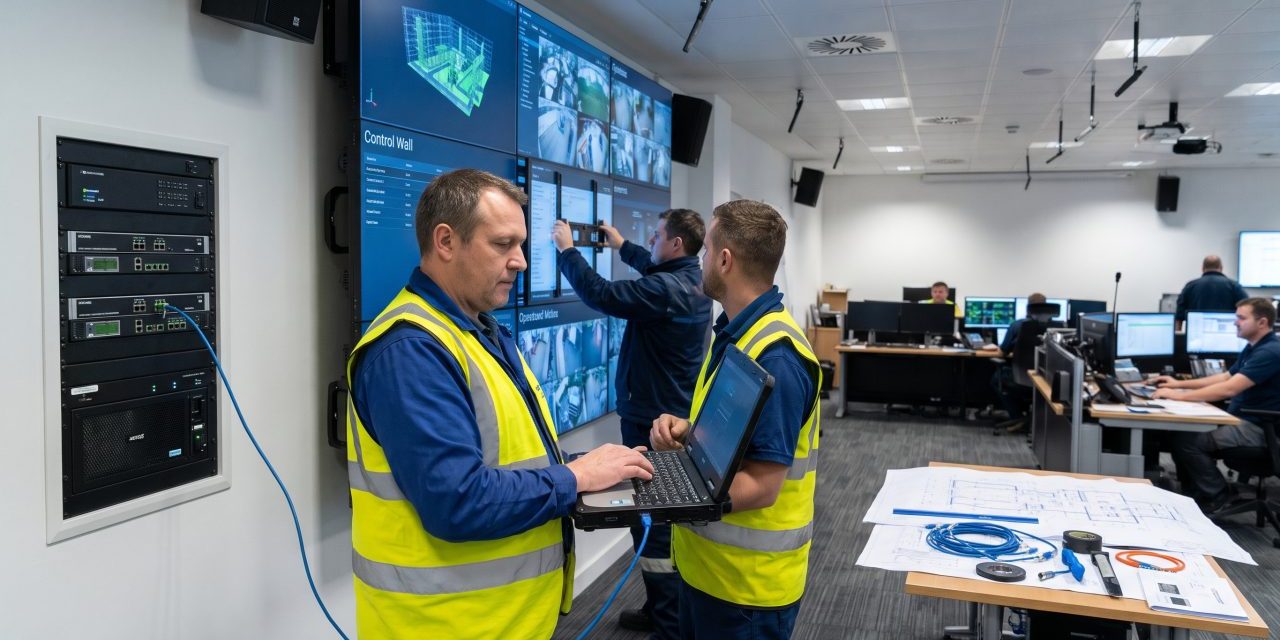
PSS designs, installs, and maintains CCTV control-room video walls and related AV — LCD and LED, processing, AVoIP and room audio — sized from viewing distance, sources and site constraints. Contact the PSS team to book a first site survey.